How to play on Porker
Poker hand rankings and kicker examples
Join a public Texas Hold’em table, from choosing a name to playing your first hand. Porker uses play chips: no real money, deposits or withdrawals.
Open the lobbyScreenshots show the English interface. The button names in this guide follow your selected language; use the language menu to switch.
Choose a name
Open Lobby. In the header, enter a name in Play as guest, then press Play. Use 3–20 characters. If the name is rejected, try another and follow the message shown.

Already have an account? Use Log in. If you choose Sign up, confirm your email to collect your starting chips. Guests can start without that account setup; save the account later if you want to keep it.
Find a public table
Look under Public tables. Each table shows its blinds, seat capacity and occupied seats. Pick one with space and press Join seat. This opens the table; you still need to choose a seat and confirm your buy-in.
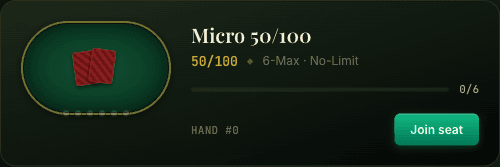
A full table offers Watch. Watch and wait, or return to the lobby for another table. If no tables appear, use ↻ Refresh. When creating one yourself, select Public under Visibility if you want it listed.
Who is at the table? Porker supports automated players when bots are enabled. The seat interface currently does not label bots, and an occupied-seat count does not tell you how many human players are there. Do not assume a table is human-only or that an opponent is always available.
Take a seat with chips
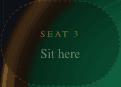
Select an empty seat marked Sit here. If the seats say Open and cannot be selected, choose a guest name or log in first.
The dialog shows the minimum and maximum buy-in and your available balance. Choose an amount using the slider or presets, then press SIT DOWN. A buy-in moves play chips from your balance to your table stack; it is not a payment.
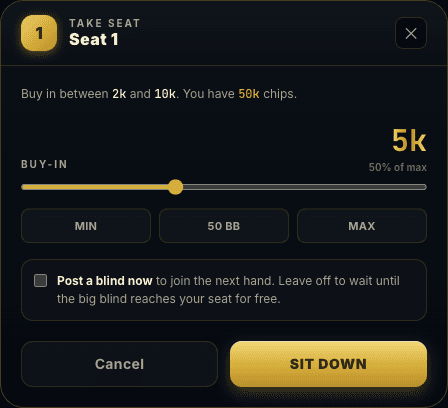
Buying in for 5,000 from 50,000 leaves 45,000 off the table and starts a 5,000-chip stack before blinds. You cannot buy in above your balance. If you cannot afford the minimum, choose lower stakes or check the chip options available to your account in the lobby.
Should I post a blind now?
Leave Post a blind now unchecked to wait until the big blind reaches your seat. Select it to post a blind and become eligible for the next hand. It does not put you into a hand already being played.
Join your first hand
No host needs to press Start. Hands begin automatically when at least two eligible players are ready. Waiting for another player means the table is not ready yet. If you joined during a hand or are waiting for the big blind, wait for your eligible hand.
Texas Hold’em rules: a complete example hand (English)
On your turn, use the available Fold, Check, Call, Bet or Raise controls. Actions depend on the current bet and your chips. Review the amount before betting or raising. On a phone, scroll below the felt to reach the action controls.
While waiting, you may see Check / fold and Call any. These are automatic choices for your next turn, so leave them off unless you intend to use them.
Use Sit out to pause and Sit in to return. Use Leave table when finished; during a hand, leaving can wait until the hand ends. The Lobby link returns to the table list.
If you cannot join
The seat was taken before I sat down
Another player may have selected it first. Close the dialog and select another empty seat, or go back to the lobby.
The table is unavailable or reconnecting
Wait for the connection to recover. If the table stays unavailable, return to the lobby and refresh the list. Check your balance and seat state after reconnecting before trying another buy-in.
This guide covers the buttons and joining flow. It does not teach hand rankings or the full rules of Texas Hold’em.